
8.5 — The Blueprint Preview Map
On this page
8.5 — The Blueprint Preview Map
The bottom half of the Prepare page is the Blueprint Preview Map — an interactive diagram of everything your spec will build and how it connects: features, roles, pages, and data, drawn as one graph. It's the fastest way to sanity-check the blueprint before you hand off to a coding agent: if a page isn't wired to any data, or a role can't reach the pages it needs, you'll see it here as a missing edge rather than discovering it mid-build.
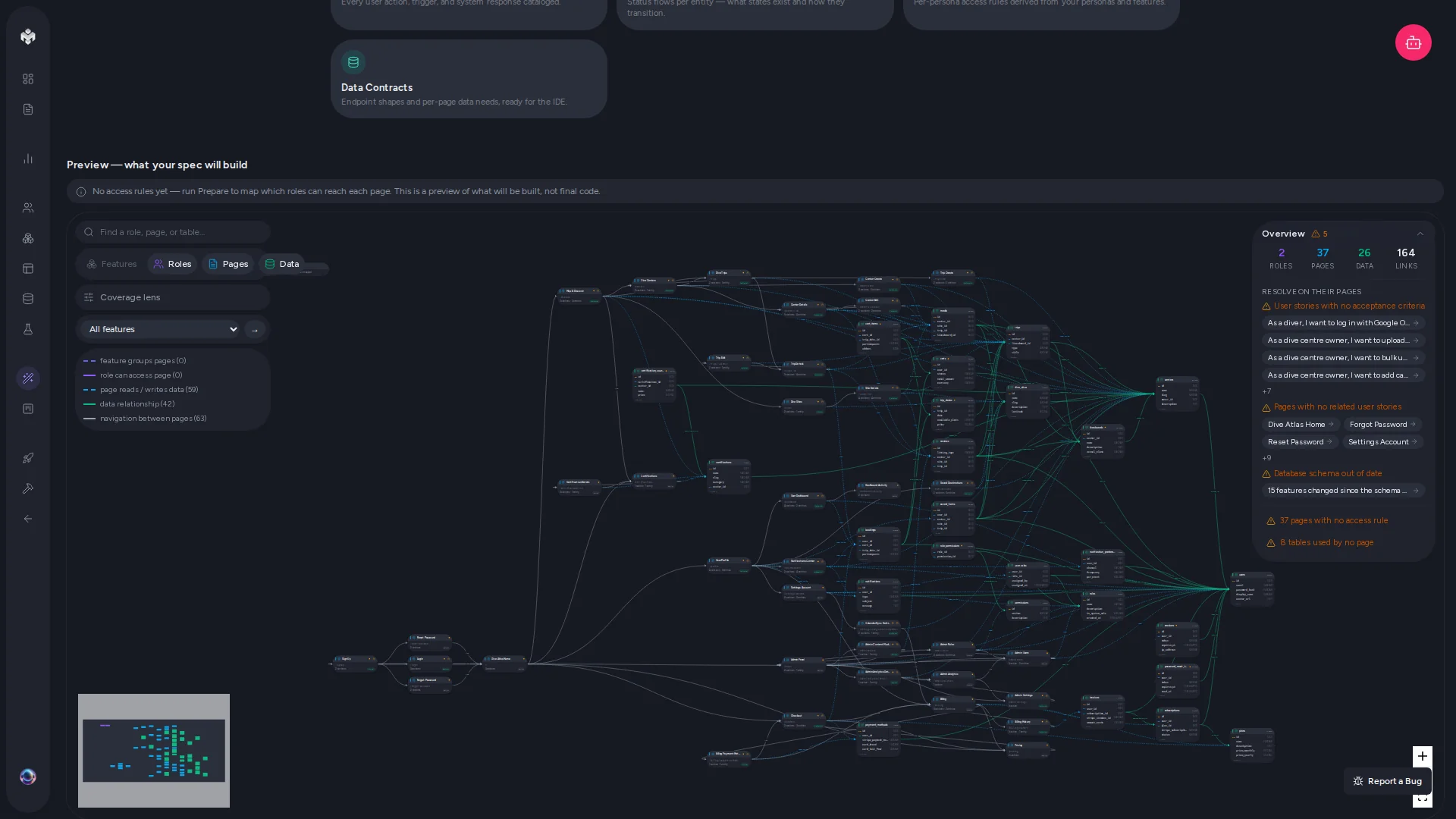
The map is read-only and available on Starter and above — it's derived entirely from your existing spec, with no LLM call, so viewing it never consumes generations. (Narration and the guided tour, which do call an LLM, are Pro+ — see below.)
A confidence banner above the map keeps expectations honest: when your schema, links, or permissions are still incomplete, it labels the map as a preview of what will be built, not final code.
What's on the map
Four toggleable layers, each with its own color:
| Layer | Color | Shows |
|---|---|---|
| Features | Indigo | Your features, connected to the pages that deliver them. |
| Roles | Violet | Personas/roles, connected to the pages they can access. |
| Pages | Sky | Every page in the spec. |
| Data / Entities | Emerald | Schema entities — each node lists up to 5 columns, with a "+more" indicator beyond that. |
Between them, five kinds of edges: feature groups page, role can access page, page reads/writes data, data relationships (foreign keys), and navigation between pages.
Navigating
- Layer toggles — hide layers you're not thinking about (e.g. turn off Roles while reviewing the data model).
- Search box — jump to any node by name.
- Single-feature filter — narrow the map to one feature and everything it touches.
- Layout toggle — switch between horizontal and vertical flow.
- Mini-map — orient yourself on large graphs.
The detail panel
Click any node and a detail panel opens on the right:
- Plain-English summary of what the node is and does (LLM-narrated on Pro+, see below).
- Coverage health — how well this node is backed by acceptance criteria.
- Connected neighbors — everything one hop away, clickable.
- Acceptance-criteria tree (pages) — the criteria that will drive this page's implementation, including the empty/error/loading UI states bound by the Spec Coverage step.
- Impact preview (pages, features, roles) — see below.
Coverage lens
Toggle the Coverage lens to overlay health rings on every node: green (ready — fully covered by acceptance criteria), amber (partial coverage), red (no coverage). It's the visual companion to the coverage checks that run during Prepare-for-Dev — a red ring here is the same gap the preflight dialog would flag.
Impact preview
For pages, features, and roles, the detail panel includes an impact preview: a deterministic walk of the foreign-key graph (no LLM) that answers "if this changes, what else is affected?" It lists the affected entities, distinguishes child records from dependent ones, and flags how hard the impact is. Use it before deciding to cut or rework something late in the spec.
Narration and the guided tour (Pro+)
On Pro and above, the map can explain itself:
- Narrate — generates a plain-English summary for each node (cached, so it's a one-time generation per spec state) plus a set of tour steps.
- Take the tour — steps you through the map node by node with a tour bar at the bottom of the screen (Back / Next), in a sensible reading order. Good for onboarding a teammate — or yourself, returning to a project after a few weeks.
Related
- 8.0 End-to-end walkthrough — where the map fits in the full flow.
- 8.2 The readiness checklist — what else needs to be true before handoff.
- 6.1 Generating schema — where the entity nodes come from.
- 5.1 Generating pages — where the page nodes come from.