
3.1-generating-personas
On this page
Generating Personas
Personas are AI-generated user archetypes that represent the different types of people who will use your product. They are created from your project description and summary, giving every feature and user story a real human context to design for.
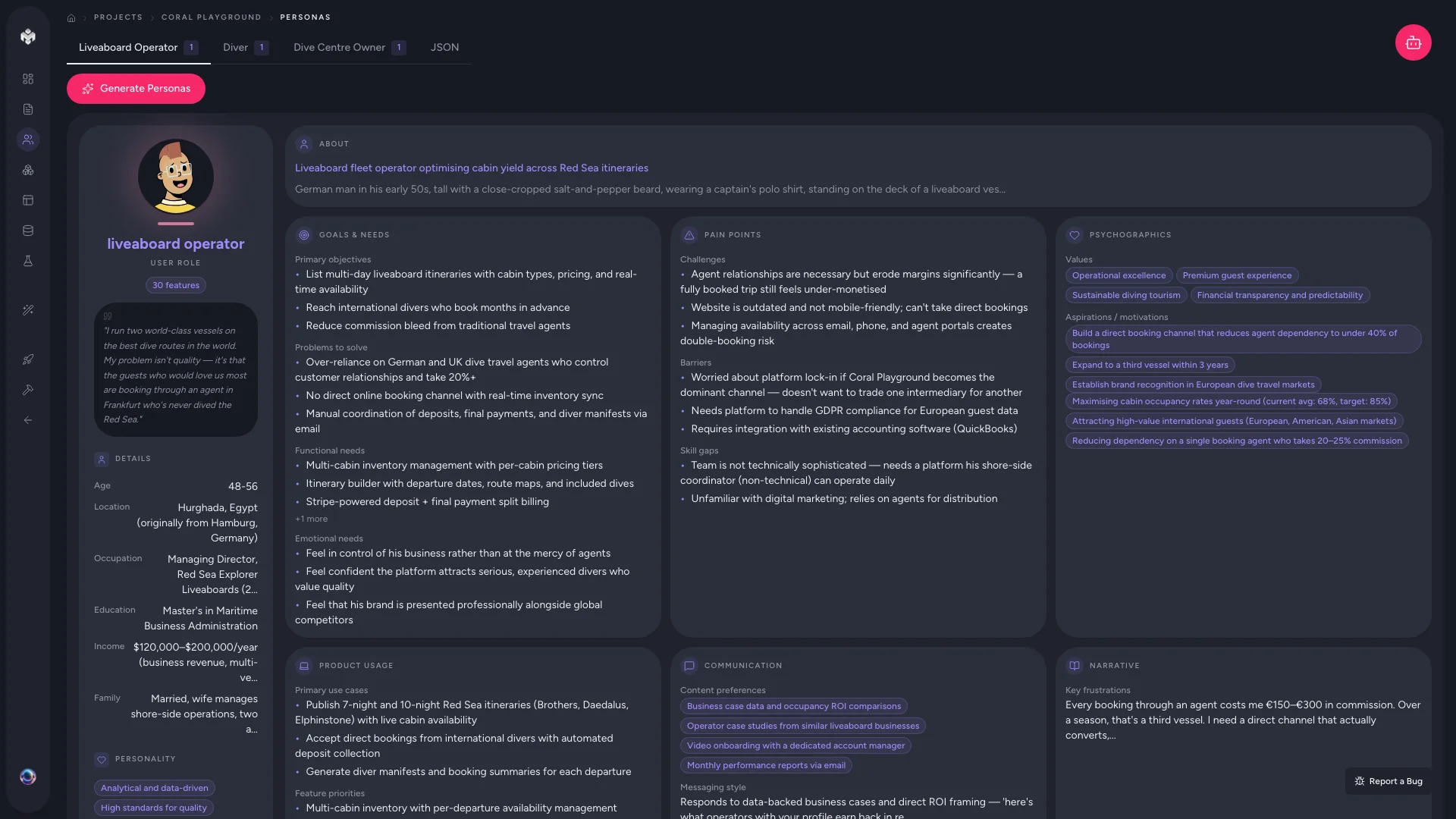
What Personas Are
A persona is a detailed profile of a fictional but realistic user. Rather than designing for a vague "user," personas let you design for specific people with specific goals, frustrations, and behaviors. This ensures your product addresses real needs rather than abstract requirements.
Each persona represents a distinct user segment -- for example, an end customer, an administrator, a content creator, or a vendor.
How Personas Are Created
When you generate personas, the AI analyzes your project description, summary, and any context you have provided about your target audience. It then identifies the key user groups and builds a detailed profile for each one.
The generation process:
- Analyzes your project -- identifies distinct user roles and segments
- Creates core identities -- assigns a name, role, and demographic profile to each persona
- Builds detailed profiles -- populates goals, pain points, behaviors, and preferences
- Saves to your project -- personas appear as cards ready for review and editing
What Each Persona Includes
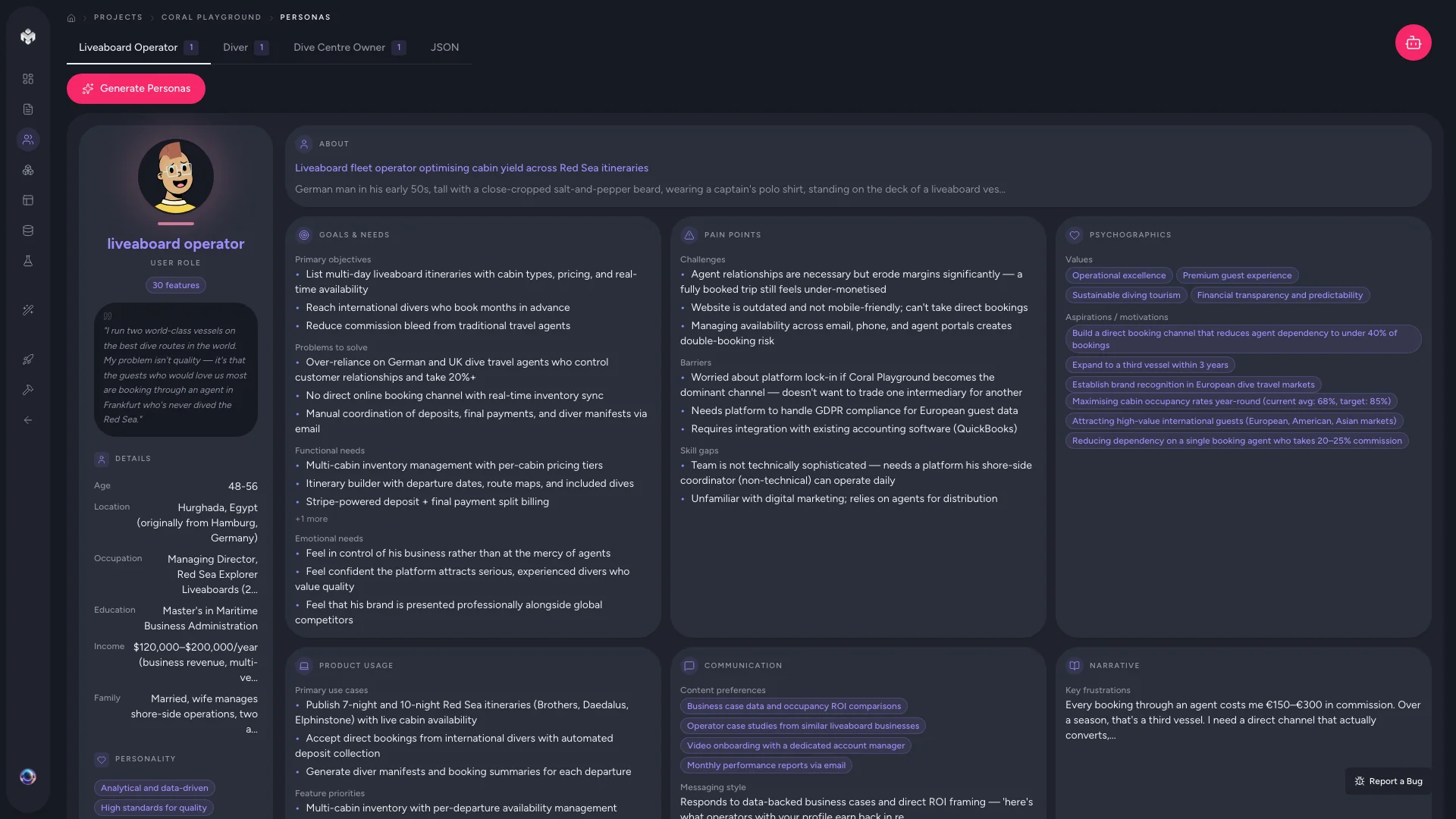
Demographics
- Name and role -- a representative name and their primary role (e.g., "Sarah Chen, Marketing Manager")
- Age range -- typical age bracket for this user type
- Location -- where this user is typically based
- Occupation -- professional background and context
Psychographics
- Behavior patterns -- how this user typically interacts with similar products
- Tech comfort level -- ranging from beginner to advanced
- Communication preferences -- email, push notifications, SMS, or in-app messaging
- Device preferences -- mobile-first, desktop, or multi-device
Goals and Motivations
What this user hopes to achieve with your product. These are specific, actionable goals tied to their role -- not generic outcomes. For example: "Quickly find and book available dive trips without calling the operator."
Pain Points
The specific frustrations and problems your product should solve for this user. These inform feature prioritization by highlighting what matters most. For example: "Currently manages bookings through a spreadsheet, leading to double-bookings and lost revenue."
Product-Specific Insights
How this persona relates to your particular product -- what features matter most to them, what their typical workflow looks like, and what would make them a power user versus a casual one.
Generating Initial Personas
- Navigate to the Personas tab in the project sidebar
- Click the Generate Personas button
- Watch the real-time progress as the AI identifies and builds each persona
- Review the generated persona cards once complete
The AI typically generates 3-5 personas for a standard project. The number depends on the complexity and scope described in your project description.
Generating Additional Personas
If the initial generation missed a user group, you have two options:
- Generate more -- click the Generate button again to have the AI identify additional user segments it may have missed
- Add manually -- click Add Persona to create a custom persona from scratch, filling in the fields yourself
Generating again works best when you have updated your project description with more detail about the missing user group.
Managing and Editing Personas
Editing a Persona
Click the edit icon on any persona card to modify its fields. Common edits include:
- Adjusting demographics to match your actual user research
- Refining goals to be more specific to your product
- Adding pain points you have discovered through customer interviews
Deleting a Persona
Remove personas that are out of scope or redundant. Keep in mind that personas are referenced by user stories, so deleting one may affect story coverage.
Duplicating a Persona
Create a variation of an existing persona by duplicating it. This is useful for representing different segments within the same role -- for example, a "Power User" versus a "Casual User."
Tips for Better Personas
- Review against real users. If you have existing customers or user research, compare the AI-generated personas against real data and adjust accordingly.
- Keep the count manageable. 3-6 personas is ideal. Too many dilutes focus; too few misses important user segments.
- Focus on goals and pain points. These are the most valuable fields for downstream generation. Demographics add context, but goals drive features.
Next Steps
Once your personas are reviewed and finalized, proceed to Features generation. The AI will use these personas to determine what functionality each user type needs, grounding every feature in a real user context.