
Acceptance criteria
On this page
Acceptance criteria
Testable Given/When/Then conditions that define "done" for every user story. · Required
Acceptance criteria are the most granular layer of your spec — the precise, verifiable behaviours a story must satisfy. They're generated alongside your stories, and they're what your test suite and your coding agent read to know exactly what to build.
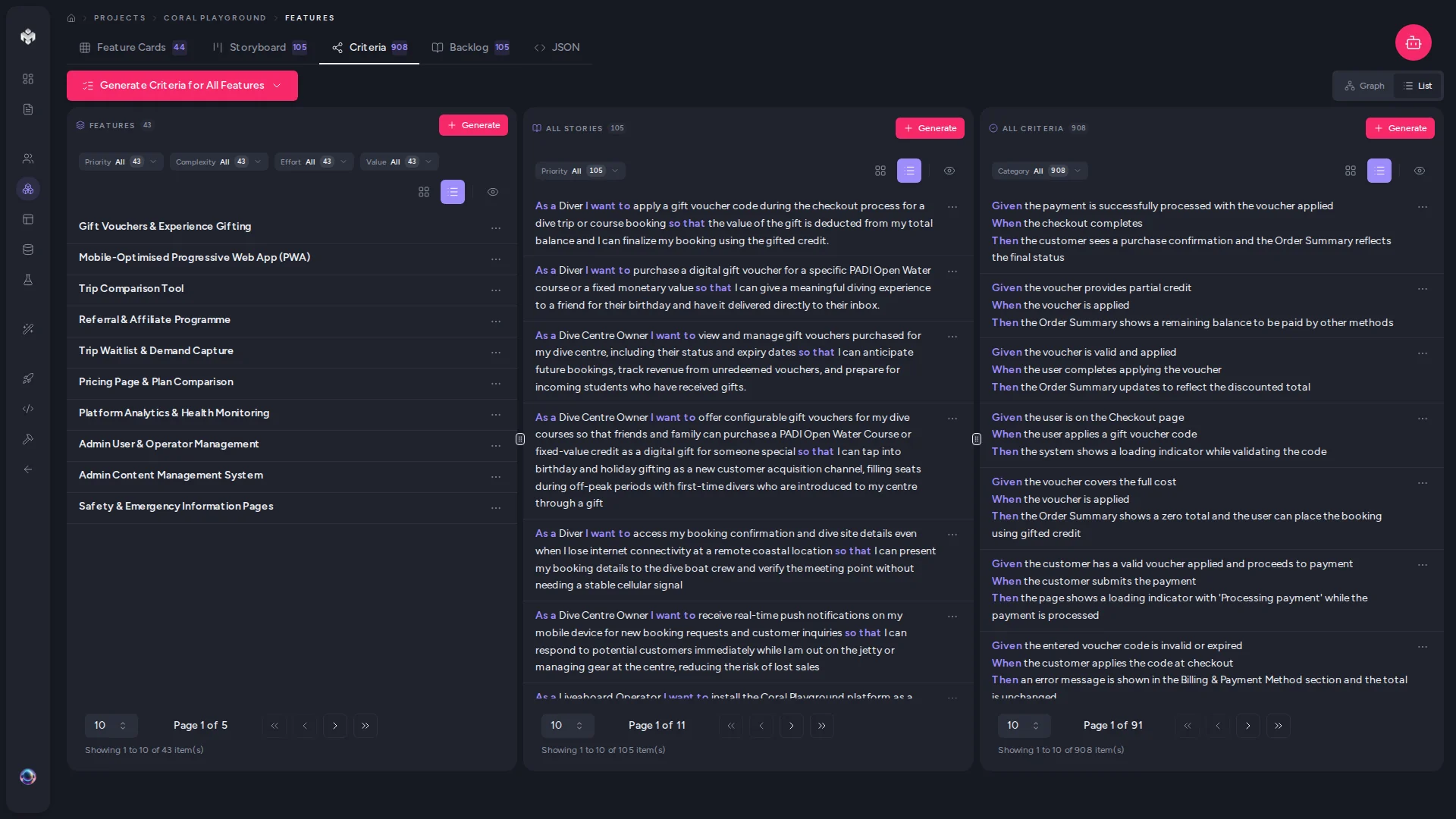 Figure: The Criteria tab on the Features page — the Feature → Story → Criteria hierarchy.
Reading your criteria
VibeMap writes criteria in Behaviour-Driven Development (BDD) form:
| Clause | Purpose | Example |
|---|---|---|
| Given | The starting state | "Given a user is on the login page" |
| When | The action | "When they submit an invalid email" |
| Then | The expected outcome | "Then an inline error is displayed" |
Each story typically gets 3–8 criteria spread across three scenario categories — happy path (the successful flow), error scenarios (validation and failures), and edge cases (boundaries and unusual-but-valid inputs). Good coverage means all three are present, not just the happy path.
Work with them in the Criteria tab on the Features page. It opens on a Graph view — feature → user story → acceptance criterion, laid out as a connected map — and a List toggle switches to the hierarchical breakdown for dense data and keyboard users:
Feature
  User Story
    Criterion 1 (Given / When / Then)
    Criterion 2 (Given / When / Then)
Each criterion shows its type, priority, and status. You can also open any story to see its criteria in the detail panel.
The two derivation directions
This is where the spec stops being a straight line and becomes a loop. Criteria can be derived from two sources, and using both is how you reach full coverage:
- Derive from features — the standard path, run with Derive Criteria from Features on the Criteria tab (or the agent's "Derive acceptance criteria" action). Criteria come from features and their stories.
- Sync from pages — once pages exist, a second pass derives criteria from your page layouts, catching UI behaviours (empty states, navigation, form flows) that the feature-centric pass can't see. Run it with Derive Criteria from Pages on the Pages page (or the agent's "Sync criteria from pages" chip).
💡 Tip: Run features → criteria first, generate pages, then sync pages → criteria. The coverage panel on the project Overview (and in Prepare for Dev) flags any story still missing criteria.
The Stale badge
Criteria carry the same amber Stale pill as stories, shown on a feature's detail page. On a criterion it means the parent user story changed after the criterion was written — one of the fields the criterion was derived from (title, description, the I-want / So-that clauses, the user role). Priority and status changes don't raise it.
Click the pill for the Changed upstream popover showing each field's before → after. It's advisory: nothing is regenerated, and a stale criterion still exports and still counts toward coverage. See Staleness and reconciliation.
Editing criteria
Add custom criteria from a story's detail view; edit to tighten conditions (exact limits, timeouts, accessibility rules); delete anything out of scope. Deleted criteria are excluded from generated tests and the blueprint.
⚡ Power-user hints
- One behaviour per criterion. If a criterion has two "Then" outcomes, split it — each maps to exactly one test row.
- Add the non-functional ones the AI skips. Performance thresholds, a11y, rate limits — these rarely appear unless you write them, and they matter at handoff.
- Vocabulary drives test type. UI words (click, view, page) classify a criterion as e2e; data words (record, API, email) as integration. Word your Given/When/Then deliberately and the Tests tab classifies itself correctly.
Author with your own agent (MCP)
Like stories, criteria have no command of their own: the same one-pass run started from Features writes the criteria under every story — see Two ways to generate.
↔ The traditional way
A QA lead or BA normally writes acceptance criteria by hand, story by story, and they're often skipped under deadline — which is how untested edge cases ship. VibeMap generates BDD criteria across happy, error, and edge scenarios for every story at once, and cross-checks them against your pages, so "definition of done" is complete before a line of code is written.
What's next
- See criteria projected into a ready-to-scaffold suite → Tests
- Give the schema and pages richer context → Generating pages