
Generating personas
On this page
Generating personas
AI-generated user archetypes that give every feature and story a real person to design for. · Recommended
Personas are the first step of the Plan phase. They turn your project summary into a handful of concrete user types, so that everything downstream — features, stories, criteria, pages — is grounded in a specific human need rather than a vague "user". You can skip straight to Features, but personas make the rest of the spec noticeably sharper.
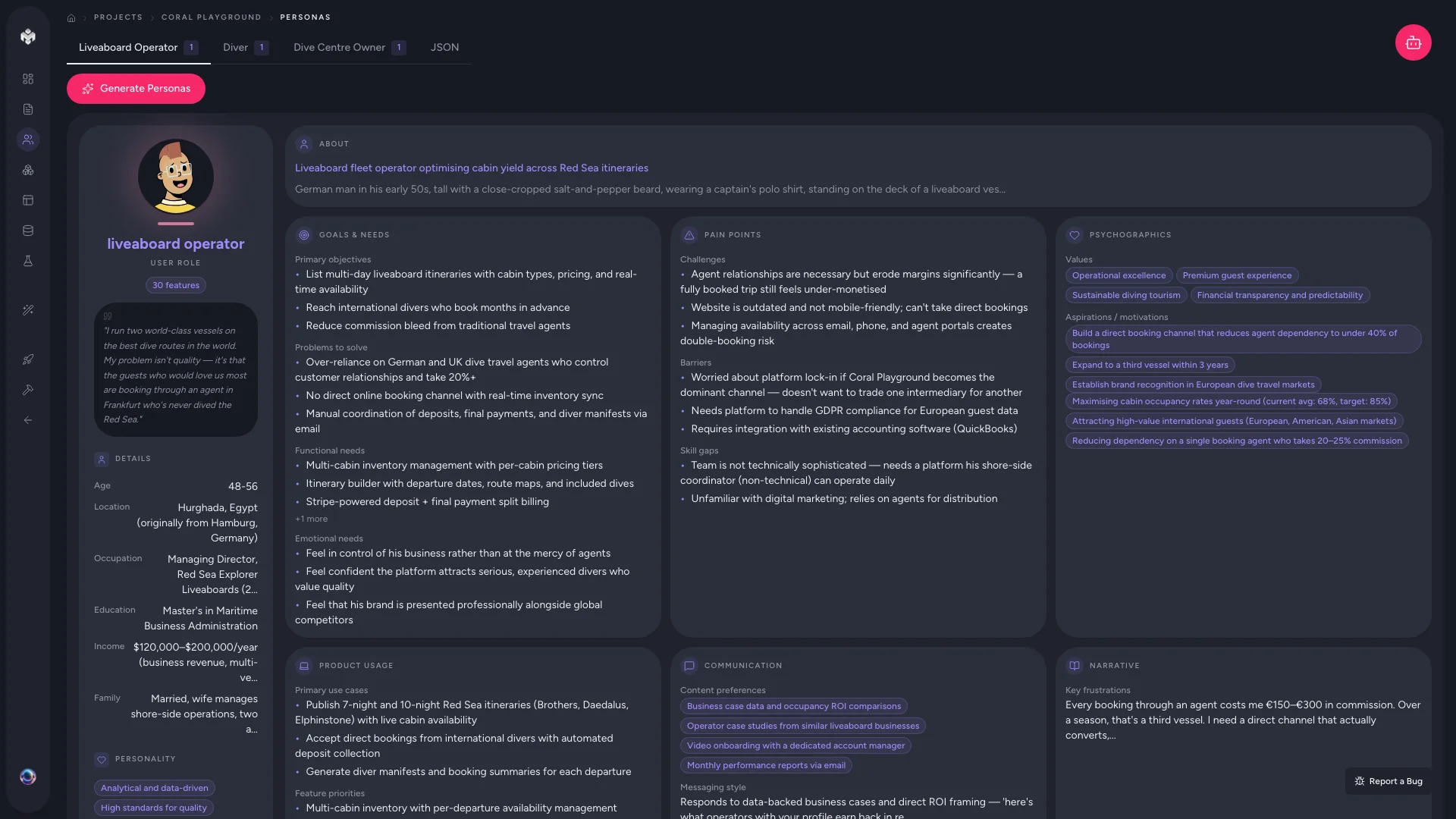 Figure: Personas overview.
Generating your personas
- Open the Personas page from the project sidebar. (On a code-first project it's under the collapsed Also available group — same page, same route.)
- Click Generate Personas.
- Watch the real-time progress as the AI reads your project description and summary, identifies distinct user segments, and builds a profile for each.
- Review the persona cards once generation completes.
VibeMap typically produces 3–5 personas for a standard project — the number scales with the scope in your description. Each card carries demographics (name, role, age range, location, occupation), psychographics (behaviour, tech comfort, communication and device preferences), goals and motivations, and pain points.
 Figure: A persona detail view.
Adding more, or editing by hand
- Generate Additional Personas — click again to have the AI find segments it missed. This works best after you've added detail about the missing group to your project description.
- Add Persona — create one from scratch and fill in the fields yourself.
- Edit / duplicate / delete — use the icons on any card. Duplicating is handy for splitting one role into a "power user" vs. "casual user" variant.
⚠️ Watch out: Personas are referenced by user stories (the "As a…" line). Deleting a persona can leave stories without an owner, so prune before you generate features, not after.
⚡ Power-user hints
- Goals and pain points do the heavy lifting. They're the fields the feature and story generators lean on most — demographics are mostly context. Spend your editing time there.
- Keep the roster tight. 3–6 personas is the sweet spot; too many dilutes feature focus.
- Feed real research back in. If you have interview notes or analytics, correct the AI's guesses — every correction compounds into better features and stories.
Author with your own agent (MCP)
Instead of clicking Generate Personas, a connected IDE agent can author your personas straight into the project on its own tokens — the "Prefer your own agent? Keep it on your tokens" disclosure under the button. Personas run on every plan, Free included, on either engine. Full detail: Two ways to generate.
↔ The traditional way
A product team normally runs user interviews and a research synthesis workshop over days or weeks to arrive at a persona deck. VibeMap drafts that deck in under a minute from your product description, giving you a first-pass set to react to and refine — you're editing a strawman rather than starting from a blank Miro board.
What's next
- Turn personas into functionality → Generating features
- Not sure your description is rich enough? → Writing effective prompts